
Devkeepr


A desktop home for development projects, running processes and local workflows.
Screenshots
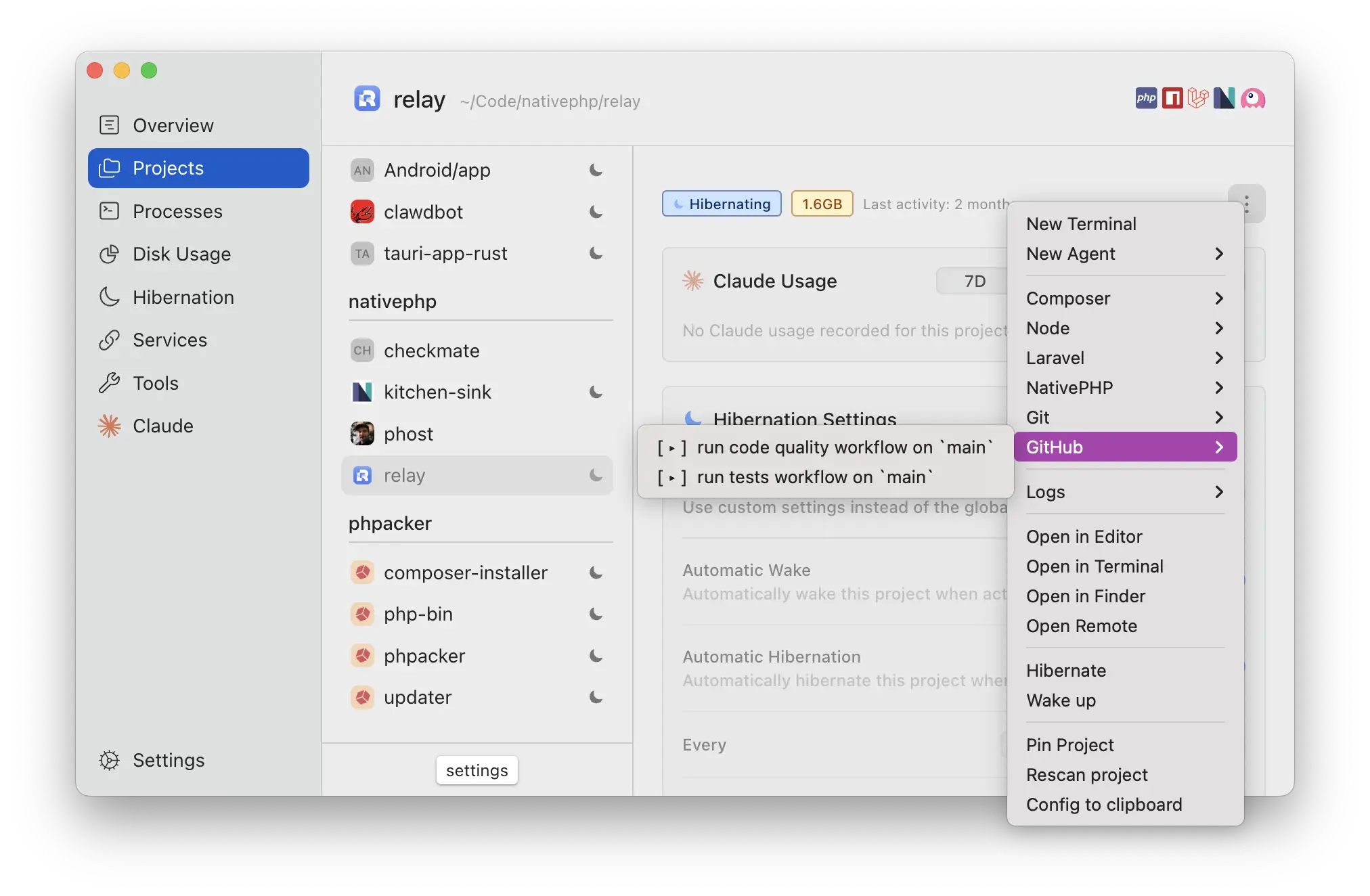
About Devkeepr
Devkeepr is a desktop workspace tool for developers who move between several projects and want the surrounding work easier to find. It brings project actions, running processes, disk usage and integrations into a shared interface. For a Laravel developer with a busy Herd directory, the appeal is having the operational details of each project close at hand.
The product is built by Eser Deniz and Willem Leuverink. Its official website describes free project-management features alongside paid integrations and workflow features. This entry concerns the Devkeepr application itself, not a Laravel Composer package or a service for hosting production applications.
Start with the project you are working on
A project directory contains more than source code. It has scripts, dependencies, logs, Git state and often several running processes. Remembering which terminal belongs to which project becomes harder as that collection grows. Devkeepr's project-oriented interface is designed to keep those pieces associated with the right working context.
For a Laravel project, that context might include Composer scripts, a frontend development process and application logs. A second project may use a different stack and different commands. A useful evaluation is to open two real projects and check whether their common actions are discoverable without rebuilding your workflow around a new naming convention.
The website also describes stack detection across a wider range of languages and frameworks. That matters if Laravel is only part of your work. A project manager can be more useful when the small supporting service, documentation site and frontend experiment are visible alongside the main application.
Understand hibernation before enabling it broadly
One of Devkeepr's central features is project hibernation. The aim is to reclaim space from idle projects by removing regenerable dependencies, caches and build output, then restoring what is needed when work resumes. This can be attractive on a laptop with many old development checkouts.
The important word is regenerable. Before applying any cleanup workflow to a valuable project, understand which files are treated as disposable and how they are restored. Keep source code and unique data under the appropriate version-control or backup arrangements. A dependency folder can usually be recreated; an untracked database or a locally generated asset may need different treatment.
The product supports project configuration through a YAML file. That makes the behaviour reviewable with the repository instead of relying entirely on remembered desktop settings. Teams should review project-specific commands as code, particularly when they remove files or fetch remote changes. A convenient interface does not change what those commands do.
Keep running work visible
The Process Window groups scripts, terminals and agent sessions by project. That can help answer an ordinary but surprisingly time-consuming question: what is still running, and which project started it? The current product also describes controls for rerunning or stopping processes and resuming supported agent sessions.
Use those features to reduce uncertainty rather than merely adding another dashboard. Check that a stopped process is really stopped and that a resumed session belongs to the expected project. When several applications use similar scripts, the surrounding project identity is often the most useful piece of information in the interface.
The official changelog is a useful companion to the feature page because it records changes to process handling and integrations. Review the version you intend to install instead of assuming an older screenshot or review describes today's behaviour. Desktop tools can change quickly as the underlying developer services evolve.
Integrations and paid features
Devkeepr offers connections for workflow monitoring and deployment-related information. Its pricing page distinguishes the free offering from Pro and team options. Features such as CI monitoring, deployment watchers and the command-line tool should be checked against that current plan information before you make them part of a required team workflow.
The changelog records work on GitHub, GitLab and Laravel Forge integrations. When evaluating a connector, start with the specific service your team uses and verify the supported actions. A broad integrations heading does not guarantee that every provider has identical functionality or that a planned integration is already available.
The application also exposes workflows involving development agents. Treat these as tools you choose to enable for a particular project. Review which process or session is being resumed and what access that tool already has. The project manager helps organise the work, while the underlying agent and service retain their own configuration and responsibilities.
A practical evaluation in Herd
Begin with a non-critical project that has a known setup command and a small test suite. Record its current state, inspect the detected actions and run a familiar task from the project interface. Then compare the result with running that same task directly. This gives you a concrete baseline for evaluating convenience without guessing about behaviour.
If you want to try hibernation, first identify the files that will be removed and the commands needed to restore them. Check that the project can rebuild from its committed dependency manifests. Once the workflow is understood on one project, it is easier to decide whether the same configuration belongs in other repositories.
Devkeepr is most relevant when project switching and local environment housekeeping consume noticeable time. A developer with one small application may need less coordination. Someone maintaining several Laravel applications, documentation sites and experiments has more opportunities to benefit from a project-centred view of the work.
Sources: Devkeepr, pricing, changelog, and documentation. The image comes from Devkeepr's official product screenshots. Availability and plan details should be confirmed on the vendor's site.
Reviews
Used Devkeepr? Share your experience.
Log in to reviewNo reviews yet
Used it? Be the first to leave a rating.